
Monday, 15 March 2010
Wednesday, 10 March 2010
Class Notes 08.03.2010
Lev Manovich ---> manovich.net
Articles ---> Understanding Hybrid Media
Graphic Design: structuring information in order to communicate
Motion Graphics: animated, non-narrative sequences that appears as part of larger piece ---> opening credits of "Catch Me If You Can"
Hybrid Media: previously separate media ---> typography, graphics, photography, animation that is now merged into one hybrid media which is the norm ---> Coldplay's music video "Don't Panic"
Deep Remixability ---> remix culture
Articles ---> Understanding Hybrid Media
Graphic Design: structuring information in order to communicate
Motion Graphics: animated, non-narrative sequences that appears as part of larger piece ---> opening credits of "Catch Me If You Can"
Hybrid Media: previously separate media ---> typography, graphics, photography, animation that is now merged into one hybrid media which is the norm ---> Coldplay's music video "Don't Panic"
Deep Remixability ---> remix culture
Monday, 1 March 2010
Class Animation 01.03.2010


The above images shows the animation that I created today in class. Essentially, the pantagon is a button that once you click on it, a short animation brings the letters of the word 'sound' onto the stage. The button also trigger music to start playing.
Class Notes 01.03.2010
Objectives Learned Today in Class:
Sound ---> new layer ---> import ---> import sound to library ---> drag sound to stage
Background Sound - can be used just to have background music playing during animation
Button Sound - can start or stop sound with clicking a button
To get change status of button sound ---> Sym. Edit Mode --->Properties ---> Sync ---> Start/Stop
Streaming File from Outside:
- has to be mp3 file
- has to be linked with where the sound file actually is
STORYBOARDS -
Storyboarding: an exercise in effective communication -- what is there and what is not there -- balance between information and communication
Evidence of Research: inspiration for animation -- other Flash animations that have things you want to do in your own animation
Planning:
- should include a frame by frame breakdown (or scene by scene)
- MUST HAVE timetable!
- could also have a flow chart
Design: make sure it looks professional and is easy to navigate
Production Timetable: shows what you are going to accomplish week by week
Aim/Rationale: explains what your project is all about and what you want to accomplish
Things that NEED to be in the Storyboard:
- production timetable
- aim/rationale
- final visual style -- including fonts and colors
- description/narrative of navigation
- show 'hot spots' of what is actually being interactive
Sound ---> new layer ---> import ---> import sound to library ---> drag sound to stage
Background Sound - can be used just to have background music playing during animation
Button Sound - can start or stop sound with clicking a button
To get change status of button sound ---> Sym. Edit Mode --->Properties ---> Sync ---> Start/Stop
Streaming File from Outside:
- has to be mp3 file
- has to be linked with where the sound file actually is
STORYBOARDS -
Storyboarding: an exercise in effective communication -- what is there and what is not there -- balance between information and communication
Evidence of Research: inspiration for animation -- other Flash animations that have things you want to do in your own animation
Planning:
- should include a frame by frame breakdown (or scene by scene)
- MUST HAVE timetable!
- could also have a flow chart
Design: make sure it looks professional and is easy to navigate
Production Timetable: shows what you are going to accomplish week by week
Aim/Rationale: explains what your project is all about and what you want to accomplish
Things that NEED to be in the Storyboard:
- production timetable
- aim/rationale
- final visual style -- including fonts and colors
- description/narrative of navigation
- show 'hot spots' of what is actually being interactive
Sunday, 28 February 2010
Research/Websites
Examples of Style/Type of Animation:
- Sprint (Nextel) "Iredell" animation ---> simple and clean graphics
- Sprint (Nextel) "Katrina" animation ---> seamless flow from different scenes
- Stash 45 ---> BD (8 minutes into animation) ---> Frame outlines the animation, almost as if you are looking through a window
BBC Recipe Finder ---> http://www.bbc.co.uk/food/
Children's Recipes ---> http://www.bbc.co.uk/cbeebies/makes/theme/cooking/all
Interactive Animation ---> natural disasters ---> objective is to learn more about the different types of natural disasters---> http://news.bbc.co.uk/1/hi/sci/tech/7533950.stm
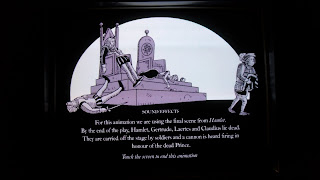
Example of An Interactive Animation at Shakespeare's Globe Theatre ---> explains how the theatre might have worked back in the day ---> how they created sounds backstage, etc.


- Sprint (Nextel) "Iredell" animation ---> simple and clean graphics
- Sprint (Nextel) "Katrina" animation ---> seamless flow from different scenes
- Stash 45 ---> BD (8 minutes into animation) ---> Frame outlines the animation, almost as if you are looking through a window
BBC Recipe Finder ---> http://www.bbc.co.uk/food/
Children's Recipes ---> http://www.bbc.co.uk/cbeebies/makes/theme/cooking/all
Interactive Animation ---> natural disasters ---> objective is to learn more about the different types of natural disasters---> http://news.bbc.co.uk/1/hi/sci/tech/7533950.stm
Example of An Interactive Animation at Shakespeare's Globe Theatre ---> explains how the theatre might have worked back in the day ---> how they created sounds backstage, etc.


Wednesday, 24 February 2010
Class Animations 22.02.2010

One of the animations that we learned how to do on Monday was essentially a way to move a scene in any direction. The image shown above is the scene I created making sure to put the foreground and background on different layers so when it came time to animate it, they would move and split apart according to whichever direction the mouse was pointing towards.

I also made another animation that had a moveable button. This animation allows you to put the star on top of the tree where it belongs.
Class Notes 22.02.2010
Objectives Learned in Class on Monday:
Importing Documents ---> file ---> import (can keep layers or flatten image)
Control Example -- methods of control -- code to use for project
Fade ---> color effect ---> change alpha percentage (shape tween)
- If you want to fade the whole screen, create a box and fade the box instead of individual items -- alpha change as well.
Add Extra Instances ---> action script ---> copy and paste single line for all quadrants ---> rename and make sure code matches up
Example - front_mc.x - = 12;
front_mc - instance name
x - quadrant
12 - speed
Interactive Animation - user input; engagement, choice
Lev Manovich - Language of New Media
- "Interactivity is a tautolgy" - stating the obvioius; anything that is on a computer screen is interactive
- danger of 'equating interactivity with physical interaction at the expense of psychological (cognitive) interaction'
- employ identification, recall - get viewer/audience to be intrigued and want to know what comes next
www.soundtoys.net ---> Towards an Aesthetic of The Interactive (CADE Remix)
Alan Peacock - Quality of Interaction
'Interactivity' VS 'The Interactive'
- engagement - inadvertent vs deliberant
- consistency - predictability vs unpredictability
- cursality -
Importing Documents ---> file ---> import (can keep layers or flatten image)
Control Example -- methods of control -- code to use for project
Fade ---> color effect ---> change alpha percentage (shape tween)
- If you want to fade the whole screen, create a box and fade the box instead of individual items -- alpha change as well.
Add Extra Instances ---> action script ---> copy and paste single line for all quadrants ---> rename and make sure code matches up
Example - front_mc.x - = 12;
front_mc - instance name
x - quadrant
12 - speed
Interactive Animation - user input; engagement, choice
Lev Manovich - Language of New Media
- "Interactivity is a tautolgy" - stating the obvioius; anything that is on a computer screen is interactive
- danger of 'equating interactivity with physical interaction at the expense of psychological (cognitive) interaction'
- employ identification, recall - get viewer/audience to be intrigued and want to know what comes next
www.soundtoys.net ---> Towards an Aesthetic of The Interactive (CADE Remix)
Alan Peacock - Quality of Interaction
'Interactivity' VS 'The Interactive'
- engagement - inadvertent vs deliberant
- consistency - predictability vs unpredictability
- cursality -
Sunday, 21 February 2010
Ideas for Main Project
This past week I've been trying to come up with interesting concepts for my main project. It has been quite difficult since the animation has to 'interactive' so I can't do a basic animation that plays once you click the play button. When thinking of different ways to represent the text and make the animation, I came up these ideas:
- have a house or castle and have people navigate through and gather clues in order to get out ---> after the viewer 'unlocks' the key to get out, have the award be the 'success' quote by Ralph Waldo Emerson
- create a jungle scene where there are three different paths to go do and viewer navigates their way through to find the magical city ---> have only one possible correct path and all others lead to a dead end of sorts
- have a garden scene where the viewer can choose vegetables and fruits which they have and want to use in a recipe ---> have multiple recipes so they have to choose what they want
- have a house or castle and have people navigate through and gather clues in order to get out ---> after the viewer 'unlocks' the key to get out, have the award be the 'success' quote by Ralph Waldo Emerson
- create a jungle scene where there are three different paths to go do and viewer navigates their way through to find the magical city ---> have only one possible correct path and all others lead to a dead end of sorts
- have a garden scene where the viewer can choose vegetables and fruits which they have and want to use in a recipe ---> have multiple recipes so they have to choose what they want
Wednesday, 17 February 2010
Class Animations 15.02.2010
Here is one animation that I created in class on Monday:
Another animation that I created was of the picture below. The obvious button that says 'Push Me' starts the animation when it is clicked and the purple rectangle also starts the animation once it is rolled over. The animation itself is of balls bouncing around the stage. The butterfly also flies across the stage, along with the word 'bee'.

Another animation that I created was of the picture below. The obvious button that says 'Push Me' starts the animation when it is clicked and the purple rectangle also starts the animation once it is rolled over. The animation itself is of balls bouncing around the stage. The butterfly also flies across the stage, along with the word 'bee'.

Class Notes 15.02.2010
Objectives Learned in Class on Monday:
Motion Tween: allows you to do more complicated motions (spin, bouncing a ball, etc.)
Creating a Tween ---> symbol ---> convert objects ---> choose graphic, movie clip, or button
Graphic - basic motion
Movie Clip - has a separate timeline (allows multiple animations for one object; man walking across stage)
Buttons - start/stop animation
Motion Tweens don't require a second keyframe
- a black diamond in the frame means it's a property keyframe which allows you to move it to a particular place at any time
Creating a Movie Clip ---> select object ---> modify ---> convert to symbol OR insert ---> new symbol
Movie - has 3D rotation tool in tool bar (good for rotating and altering animation)
Motion Editor - alls to see full animation; easy to tweek
Symbol Editing Mode:
- allow you to edit
- only allows one change to happen at a time (duplicate layer to get around this)
- has it's own timeline -- allows for multiple animations
--dashed line means the tween is not working; something is wrong and needs to be fixed in order for animation to work
Buttons:
- up/over/down -- can change colors or shape when curser rolls over it
- hit -- invisible button or hot spot
Action Script ---> right click ---> actions
- use script from examples to create animations (copy and paste)
- name in script (start_button) can be anything you want it to be
- name in script and instance name need to match in order for animation to work
- instance name is different for each button/animation if multiple copies are on stage
- instance name can be different than the library name
Movie Clips can be buttons too ---> curser trigger events/animations when:
out - curser rolls out/off of button
over - curser rolls over button
down - curser click down on the button
up/click - curser is released or in the 'up' position
hit - area that counts as the button but is invisible (only way to tell it's a button is when you roll the curser rolls over the area the arrow changes to a hand)
Spin File -- play (line 11) - can change to:
gotoAndstop(2);
prevframe();
nextframe();
stop();
play();
Motion Tween: allows you to do more complicated motions (spin, bouncing a ball, etc.)
Creating a Tween ---> symbol ---> convert objects ---> choose graphic, movie clip, or button
Graphic - basic motion
Movie Clip - has a separate timeline (allows multiple animations for one object; man walking across stage)
Buttons - start/stop animation
Motion Tweens don't require a second keyframe
- a black diamond in the frame means it's a property keyframe which allows you to move it to a particular place at any time
Creating a Movie Clip ---> select object ---> modify ---> convert to symbol OR insert ---> new symbol
Movie - has 3D rotation tool in tool bar (good for rotating and altering animation)
Motion Editor - alls to see full animation; easy to tweek
Symbol Editing Mode:
- allow you to edit
- only allows one change to happen at a time (duplicate layer to get around this)
- has it's own timeline -- allows for multiple animations
--dashed line means the tween is not working; something is wrong and needs to be fixed in order for animation to work
Buttons:
- up/over/down -- can change colors or shape when curser rolls over it
- hit -- invisible button or hot spot
Action Script ---> right click ---> actions
- use script from examples to create animations (copy and paste)
- name in script (start_button) can be anything you want it to be
- name in script and instance name need to match in order for animation to work
- instance name is different for each button/animation if multiple copies are on stage
- instance name can be different than the library name
Movie Clips can be buttons too ---> curser trigger events/animations when:
out - curser rolls out/off of button
over - curser rolls over button
down - curser click down on the button
up/click - curser is released or in the 'up' position
hit - area that counts as the button but is invisible (only way to tell it's a button is when you roll the curser rolls over the area the arrow changes to a hand)
Spin File -- play (line 11) - can change to:
gotoAndstop(2);
prevframe();
nextframe();
stop();
play();
Tuesday, 9 February 2010
Class Notes 08.02.2010
Objectives Learned Yesterday:
Tweening: need two key frames - one at the beginning and one at the end; allows you to move things across the stage without having to insert a lot of key frames
Classic Tween (Blue) - need two key frames and a grouped object (grouped objects have a blue box around object); moves object from Point A to Point B
Shape Tween (Green) - need two key frames and object must be broken apart (broken apart objects have dots in the image/shape); easily changes the shape of an object
Onion Skins: shows the individual steps of a motion tween (helps to see where objects actually go and can also help when tweeking a project)
Removing Frames ---> highlight frames and right click then delete frames OR CMD and put mouse at end until double head arrow appears and then drag that up and down to delete as many frames as needed
To break something apart ---> modify ---> break apart OR CMD B
Anything you want to move or animate has to be on separate LAYERS in order for everything to work correctly.
Tweening: need two key frames - one at the beginning and one at the end; allows you to move things across the stage without having to insert a lot of key frames
Classic Tween (Blue) - need two key frames and a grouped object (grouped objects have a blue box around object); moves object from Point A to Point B
Shape Tween (Green) - need two key frames and object must be broken apart (broken apart objects have dots in the image/shape); easily changes the shape of an object
Onion Skins: shows the individual steps of a motion tween (helps to see where objects actually go and can also help when tweeking a project)
Removing Frames ---> highlight frames and right click then delete frames OR CMD and put mouse at end until double head arrow appears and then drag that up and down to delete as many frames as needed
To break something apart ---> modify ---> break apart OR CMD B
Anything you want to move or animate has to be on separate LAYERS in order for everything to work correctly.
Wednesday, 3 February 2010
Words for Project
To laugh often and much;
to win the respect of intelligent people
and the affection of children;
to earn the appreciation of honest critics
and to endure the betrayal of false friends;
to appreciate beauty;
to find the best in others;
to leave the world a bit better
whether be a healthy child, a garden patch
or a redeemed social condition;
to know even one life has breathed easier
because you have lived.
This is to have succeeded.
-Ralph Waldo Emerson
to win the respect of intelligent people
and the affection of children;
to earn the appreciation of honest critics
and to endure the betrayal of false friends;
to appreciate beauty;
to find the best in others;
to leave the world a bit better
whether be a healthy child, a garden patch
or a redeemed social condition;
to know even one life has breathed easier
because you have lived.
This is to have succeeded.
-Ralph Waldo Emerson
Monday, 1 February 2010
First Animation 01.02.2010
During Class today, we worked on using the tools in Flash to make a self portrait. We then were shown how to make a simple animation. I chose to make my eyes blink. Not bad for my first time creating an animation with Flash.
Class Notes 01.02.2010
Objectives Learned Today:
Changing a Bitmap to Vector ---> modify ---> bitmap ---> trace bitmap
Frames: individual slot on timeline
- ordinary: can't change; identical to preceeding key frame
- key: can change --> quick key to insert a key frame is F6
Test Movie ---> CMD & ENT
Publishing Work:
create SWF (actual animation)
create FLA (working file)
Changing a Bitmap to Vector ---> modify ---> bitmap ---> trace bitmap
Frames: individual slot on timeline
- ordinary: can't change; identical to preceeding key frame
- key: can change --> quick key to insert a key frame is F6
Test Movie ---> CMD & ENT
Publishing Work:
create SWF (actual animation)
create FLA (working file)
Wednesday, 27 January 2010
Analytical Framework
The three animations I chose were Virgin Atlantic, Virgin America, and the old version of Hitchhiker's Guide.
Virgin Atlantic :
- piculated graphics
- intention is to give safety information for passengers
- light-hearted and humorous -- boring topic adds interesting approach (character animation) to inform viewers
- modern -- compared to others made in 1970's era
- bright colors that captions the viewers attention -- also color choice is important; yellow portrays safety
- successful animation -- as successful as a safety video can be; if the viewer is not going to watch it, the viewer is not going to be informed
Virgin America :
- hand drawn and imported into flash
- information slightly different -- portrays information that pertains to the 'American passengers' (unlikely to be flying over large bodies of water, etc.)
- upbeat and funny commentary
- dull, subdued colors -- almost completely color less except for important information (Virgin logo, direction arrows, etc.)
- pretty successful animation, however, seems like animation was hastily put together -- almost like a rough draft of the final version
Hitchhiker's Guide :
- introduction to film -- scrolling of text emulates 'Star Wars' introduction
- retro look to graphics and animation
- purpose is to inform viewers of the 'Hitchhiker's Guide' from the Hitchhiker's Guide to the Galaxy
- explains how God must exist because of proof of the Rabel Fish
- old school type -- text looks like original typeface used in the first version of the Apple Computer
- bright color on black background -- more visually appealing
- seems futuristic from back in the 1970/80's but now that we are in the 'future' it isn't at all what we thought it would have looked like
- semi-successful animation -- only people who have seen/read the book know what the animation is portraying so had limited audience
Virgin Atlantic :
- piculated graphics
- intention is to give safety information for passengers
- light-hearted and humorous -- boring topic adds interesting approach (character animation) to inform viewers
- modern -- compared to others made in 1970's era
- bright colors that captions the viewers attention -- also color choice is important; yellow portrays safety
- successful animation -- as successful as a safety video can be; if the viewer is not going to watch it, the viewer is not going to be informed
Virgin America :
- hand drawn and imported into flash
- information slightly different -- portrays information that pertains to the 'American passengers' (unlikely to be flying over large bodies of water, etc.)
- upbeat and funny commentary
- dull, subdued colors -- almost completely color less except for important information (Virgin logo, direction arrows, etc.)
- pretty successful animation, however, seems like animation was hastily put together -- almost like a rough draft of the final version
Hitchhiker's Guide :
- introduction to film -- scrolling of text emulates 'Star Wars' introduction
- retro look to graphics and animation
- purpose is to inform viewers of the 'Hitchhiker's Guide' from the Hitchhiker's Guide to the Galaxy
- explains how God must exist because of proof of the Rabel Fish
- old school type -- text looks like original typeface used in the first version of the Apple Computer
- bright color on black background -- more visually appealing
- seems futuristic from back in the 1970/80's but now that we are in the 'future' it isn't at all what we thought it would have looked like
- semi-successful animation -- only people who have seen/read the book know what the animation is portraying so had limited audience
Subscribe to:
Posts (Atom)